
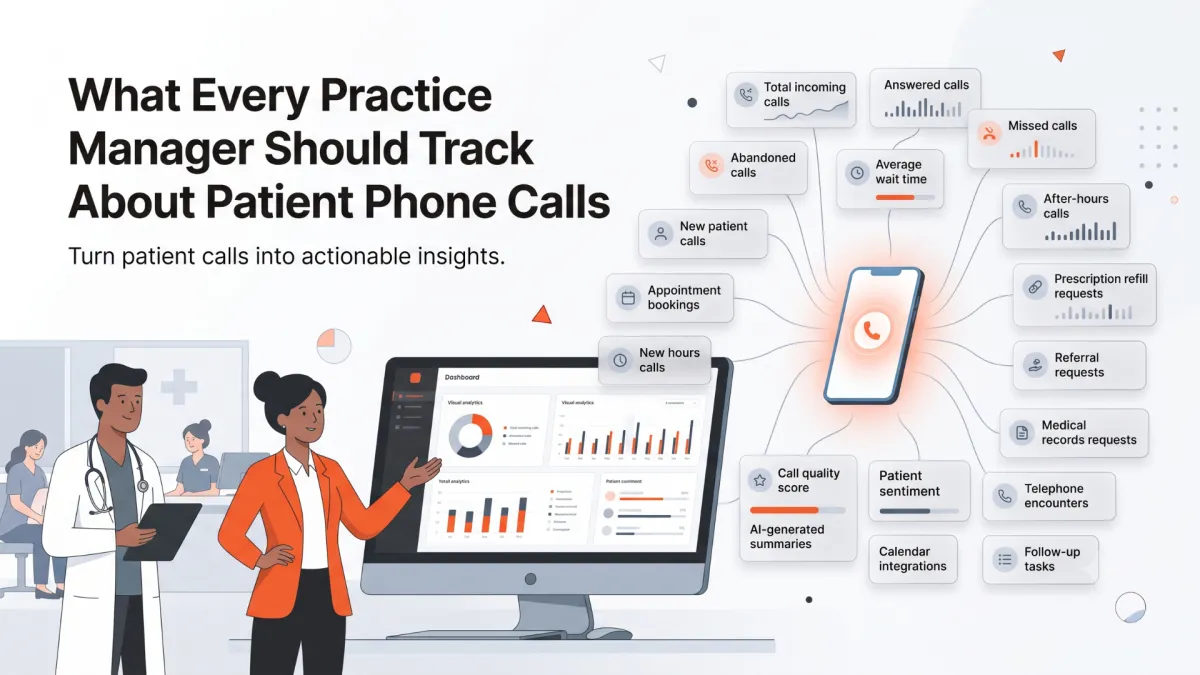
What Every Practice Manager Should Track About Patient Phone Calls
Practice managers should track more than total call volume. Important metrics include answered calls, missed calls, abandoned calls, hold times, call reasons, appointment bookings, after-hours activity, transfers, repeat calls, follow-up needs, and call quality. Together, these metrics show where patients experience friction and where the practice can improve access, staffing, scheduling, and service.
Patient phone calls reveal more about a medical practice than most managers realize.
They show when patients are struggling to reach the office.
They reveal which departments generate the most questions.
They highlight scheduling bottlenecks, staffing gaps, referral delays, and recurring administrative problems.
Yet many practices track only one basic metric: the total number of calls received.
That number alone is not enough.
A practice may answer hundreds of calls each day and still lose new patients, create long hold times, miss urgent requests, and overwhelm front desk staff.
Practice managers need a clearer picture of what happens before, during, and after every call.
By tracking the right phone metrics, managers can improve patient access, reduce front desk workload, identify operational problems, and make better staffing decisions.
Total Incoming Call Volume
The first metric to track is the total number of incoming calls.
This establishes the overall demand placed on your front desk.
Call volume should be reviewed by:
Day
Week
Month
Hour of the day
Day of the week
Location
Department
Phone number
Looking only at monthly totals can hide important patterns.
A practice may have manageable call volume overall but experience severe spikes every Monday morning or during lunch.
Understanding when calls arrive helps managers plan staffing more effectively.
Calls Answered
The number of answered calls shows how much patient demand the practice successfully handles.
This metric becomes more useful when compared with total incoming calls.
For example, receiving 1,000 calls and answering 950 is very different from receiving 1,000 calls and answering 650.
Managers should track both the total number and the percentage of calls answered.
A consistently low answer rate may indicate:
Insufficient staffing
Poor phone routing
Long call durations
High call volume during certain periods
Too many front desk responsibilities
Limited after-hours coverage
Missed Calls
Every missed call represents a patient who did not receive immediate assistance.
Some missed calls come from established patients asking routine questions.
Others may come from new patients ready to schedule.
Practice managers should track:
Total missed calls
Missed call percentage
Time of day
Day of the week
Whether the caller left a voicemail
Whether the call was returned
How long it took to return the call
Missed calls should not be treated as a minor phone issue.
They may represent lost appointments, delayed care, and patient frustration.
Abandoned Calls
An abandoned call occurs when a patient hangs up before reaching someone.
This often happens because of:
Long hold times
Complicated phone menus
Repeated transfers
Poor call routing
Staffing shortages
Technical problems
Abandoned calls are especially important because the practice may never know why the patient called.
A high abandonment rate often indicates that patients are willing to wait only so long before giving up.
Average Speed to Answer
Average speed to answer measures how long patients wait before someone answers.
A call may technically be answered, but a five-minute wait can still create a poor experience.
This metric helps managers understand whether callers receive prompt assistance.
It should be reviewed alongside abandoned calls.
When wait times increase, abandonment usually increases as well.
Average Hold Time
Hold time measures how long callers remain on hold after someone initially answers.
Patients may be placed on hold while staff:
Finish helping another patient
Search for appointment availability
Confirm insurance information
Locate a referral
Find the correct department
Speak with a provider
Occasional holds are unavoidable.
Consistently long holds suggest workflow or staffing problems.
Call Duration
Average call duration helps managers understand how much staff time phone conversations consume.
Long calls are not always a problem.
Some patients have complex needs.
However, unusually long calls may indicate:
Staff difficulty finding information
Complicated scheduling rules
Repeated data collection
Inefficient systems
Too many transfers
Unclear workflows
Call duration should also be reviewed by call type.
A prescription refill request should not take as long as a complex new patient scheduling call.
Call Volume by Time of Day
Hourly call patterns are one of the most useful tools for staffing decisions.
Many practices experience predictable peaks:
When the office opens
Monday mornings
During lunch
After school
Late afternoon
The day after a holiday
Managers can use this information to:
Adjust staff schedules
Stagger lunch breaks
Assign dedicated phone coverage
Add after-hours support
Use overflow answering
Automate routine calls
Staffing should reflect when patients actually call, not just standard office hours.
Call Volume by Day of the Week
Some days generate more calls than others.
Mondays are often especially busy because patients are calling after the weekend.
Other practices may experience higher volume on days when certain providers are in clinic.
Tracking daily patterns helps managers understand whether recurring overload is predictable.
If it is predictable, it can usually be planned for.
Reasons for Patient Calls
Knowing how many calls arrive is useful.
Knowing why patients call is much more valuable.
Common categories include:
New patient appointments
Existing patient appointments
Rescheduling
Cancellations
Prescription refills
Referrals
Medical records
Test results
Billing
Insurance questions
Directions
Office hours
Provider messages
Clinical concerns
Other requests
Call reason data reveals where the practice spends the most time.
It also identifies which calls may be automated or handled through better patient education.
Appointment-Related Calls
Appointments often represent the largest category of patient calls.
Managers should separate appointment calls into:
New appointments
Follow-up appointments
Rescheduling
Cancellations
Confirmations
Waitlist requests
Same-day requests
These categories have different operational implications.
A large number of rescheduling calls may indicate inconvenient appointment times.
A large number of new patient inquiries without bookings may indicate poor availability or scheduling friction.
New Patient Call Conversion
New patient calls should be tracked separately from routine patient calls.
Important metrics include:
Number of new patient inquiries
Number of appointments booked
Conversion rate
Reasons patients did not schedule
Average time to appointment
Insurance-related barriers
Referral-related barriers
Calls lost or abandoned
A practice may invest heavily in marketing while losing potential patients during the phone conversation.
Tracking conversion helps managers understand whether marketing interest becomes actual appointments.
Appointments Booked by Phone
The number of appointments booked during calls shows how effectively the phone channel supports practice growth.
Managers should track:
Total appointments booked
New patient appointments
Existing patient appointments
Appointment type
Provider
Location
Time of day
Staff member or system handling the call
This helps identify which phone workflows produce the best results.
Calls That Did Not Result in an Appointment
Not every scheduling call results in a booking.
Practice managers should track why.
Common reasons include:
No suitable appointment available
Appointment too far in the future
Insurance not accepted
Referral required
Caller chose another practice
Patient needed a different specialty
Caller requested a callback
Call disconnected
Patient was transferred
Staff could not complete scheduling
These reasons reveal problems that raw appointment totals cannot show.
After-Hours Calls
Many patient calls occur before the office opens, after closing, or on weekends.
Managers should track:
Total after-hours calls
Reasons for those calls
New patient inquiries
Appointment requests
Urgent escalations
Voicemails
Calls handled successfully
Calls requiring next-day follow-up
After-hours demand helps managers determine whether voicemail alone is sufficient.
Voicemail Volume
Voicemail is often treated as a backup.
In many practices, it becomes a large part of daily operations.
Managers should track:
Number of voicemails
Time received
Reason for the message
Department responsible
Time to callback
Whether the issue was resolved
Whether the patient called again
A growing voicemail backlog may indicate that patients are unable to reach staff during normal hours.
Callback Time
Patients notice how long it takes to receive a response.
Managers should measure the time between:
The original missed call or voicemail
The staff callback
Final resolution
Callback time should be reviewed by call type.
A routine records request may tolerate a longer response time.
A new patient appointment inquiry may not.
A delayed callback can easily become a lost appointment.
First-Call Resolution
First-call resolution measures whether the patient’s request is completed during the initial conversation.
Examples include:
Appointment booked
Appointment rescheduled
Question answered
Refill request collected
Referral status explained
Call routed correctly
A low first-call resolution rate creates repeat calls and additional work.
Patients become frustrated when they must call several times for the same issue.
Repeat Calls
Repeat calls often signal unresolved problems.
Managers should track when the same patient calls multiple times about the same request.
Common causes include:
No callback
Unclear instructions
Incomplete referral processing
Delayed refill requests
Missing records
Scheduling confusion
Lack of ownership
Reducing repeat calls can significantly decrease overall call volume.
Call Transfers
Transfers are sometimes necessary.
Too many transfers create frustration and increase the chance of disconnection.
Managers should track:
Number of transfers
Transfer destination
Whether the transfer was successful
Whether the patient repeated information
Whether the call was resolved
Whether the patient called back
High transfer rates may indicate that call routing or staff training needs improvement.
Transfer Accuracy
A transfer only helps when the patient reaches the correct person.
Managers should review whether calls are sent to the right:
Department
Location
Provider team
Billing team
Referral coordinator
Clinical staff member
Incorrect transfers waste time for both patients and staff.
Call Escalations
Some calls require immediate attention.
Examples may include:
Urgent symptoms
Medication problems
Emotional distress
Complaints
Threats
Requests for supervisors
Clinical escalation
Managers should track:
Number of escalations
Reason
Response time
Destination
Outcome
Whether the escalation followed practice policy
This helps ensure that urgent or sensitive calls are handled safely and consistently.
Telephone Encounters Created
Many calls result in a message or telephone encounter being sent to clinical staff.
Managers should track:
Number of telephone encounters
Reason
Department
Priority
Time created
Time closed
Whether additional patient contact was required
A high number of open encounters may reveal a downstream workflow problem even when calls are answered successfully.
Prescription Refill Requests
Refill calls can consume a significant amount of front desk time.
Useful metrics include:
Number of refill requests
Medication information collected
Pharmacy information collected
Requests routed correctly
Time to clinical review
Repeat calls for the same refill
Urgent refill requests
Incomplete information often leads to additional calls.
A structured collection process can reduce that burden.
Referral Calls
Referral-related calls are often complex and may involve several departments.
Managers should track:
New referral inquiries
Referral status calls
Missing documentation
Insurance authorization issues
Referring provider questions
Time to scheduling
Repeat calls
Referrals that did not convert into appointments
This data helps identify where the referral process breaks down.
Medical Records Calls
Medical records requests can generate repeated phone traffic.
Managers should track:
Number of requests
Type of records requested
Request source
Completion time
Missing authorization
Follow-up calls
Requests sent to the wrong department
Frequent follow-up calls may indicate that patients are not receiving clear timelines.
Insurance and Billing Calls
Insurance and billing questions often require more time than routine scheduling calls.
Managers should track:
Call volume
Call duration
Common questions
Transfer rates
Resolution rates
Repeat calls
Escalations
Time to resolution
Recurring questions may reveal a need for clearer website information, scripts, or patient education.
Calls by Location or Department
Multi-location practices should compare phone performance across offices.
Useful comparisons include:
Call volume
Answer rate
Missed calls
Wait time
Appointment conversion
Transfer rate
Call reasons
After-hours demand
Differences between locations may reveal staffing or workflow issues.
Call Quality
Call quantity does not tell the full story.
Practice managers should also review quality.
Quality criteria may include:
Professional greeting
Accurate patient information
Correct appointment type
Appropriate empathy
Clear next steps
Correct routing
Proper escalation
Complete documentation
Compliance with practice policies
Quality review helps managers identify training needs and maintain consistent patient service.
Patient Sentiment
Patient tone can provide useful operational insight.
Calls may be categorized as:
Positive
Neutral
Frustrated
Confused
Angry
Distressed
A growing number of frustrated calls may indicate problems with:
Appointment availability
Hold times
Billing
Referral delays
Communication
Staff responsiveness
Sentiment should be treated as a trend, not a perfect measurement.
Staff Workload
Call metrics should also help managers understand employee workload.
Useful indicators include:
Calls handled per staff member
Average call duration
Time spent on phone work
Number of transfers
Number of follow-up tasks
Overtime
Unanswered calls during peak periods
This data should not be used simply to pressure employees to handle more calls.
It should be used to identify where staffing, processes, or technology need improvement.
Follow-Up Tasks Created
Many calls require action after the conversation ends.
Examples include:
Provider messages
Referral follow-up
Records requests
Insurance verification
Appointment review
Billing follow-up
Prescription refill processing
Managers should track how many tasks are created and whether they are completed on time.
A call may appear resolved even though the required follow-up remains open.
Outcomes of Patient Calls
Every call should ideally lead to a clear outcome.
Common outcomes include:
Appointment booked
Appointment changed
Question answered
Message sent
Refill request collected
Call transferred
Callback required
Escalation completed
No resolution
Caller disconnected
Outcome tracking helps managers see whether calls produce meaningful results.
Why These Metrics Matter
Phone metrics are not just call center statistics.
They affect:
Patient access
Practice growth
Staff workload
Appointment volume
Patient satisfaction
Provider efficiency
Revenue
Front desk turnover
A high missed-call rate may reduce new patient growth.
Long hold times may increase complaints.
Frequent repeat calls may overwhelm staff.
Poor transfer accuracy may delay care.
Each metric points to a different operational opportunity.
Avoid Tracking Metrics Without Context
Metrics can be misleading when viewed in isolation.
For example:
A high average call duration may reflect inefficient workflows.
It may also reflect a specialty where patients naturally require more support.
A low transfer rate may indicate strong first-call resolution.
It may also indicate that staff are keeping calls they should escalate.
Practice managers should combine call data with workflow knowledge and staff feedback.
Build a Simple Practice Manager Dashboard
A useful phone dashboard does not need to display every possible metric.
A one-page overview may include:
Total calls
Answered calls
Missed calls
Answer rate
Average speed to answer
Average call duration
After-hours calls
New patient calls
Appointments booked
Appointment conversion rate
Telephone encounters created
Top call reasons
Call volume by hour
Call outcomes
Calls requiring follow-up
Managers can then investigate specific areas when a metric changes.
Review Trends, Not Just Daily Numbers
One unusual day does not always indicate a problem.
Managers should compare:
This week versus last week
This month versus last month
Current performance versus targets
Individual locations
Business hours versus after hours
Peak periods versus normal periods
Trends reveal whether the practice is improving or whether problems are becoming more frequent.
Turn Phone Data Into Action
Tracking metrics only creates value when the practice acts on them.
Examples include:
Adding phone coverage during peak hours
Updating scheduling rules
Improving referral workflows
Creating clearer patient instructions
Reducing unnecessary transfers
Automating routine questions
Offering after-hours scheduling
Training staff on common call types
Adding new patient appointment capacity
The goal is not to create more reports.
The goal is to improve how patients reach and interact with the practice.
How AI Receptionists Improve Call Visibility
Traditional phone systems often provide limited information.
They may show call length and whether a call was answered, but not why the patient called or what happened.
AI receptionists can provide more detailed operational data.
Depending on the system, managers may be able to track:
Call reason
Patient intent
Appointment outcome
Call summary
Sentiment
Escalation
Follow-up requirement
Appointment type
New versus established patient
Resolution status
This gives practice managers a much clearer understanding of patient demand.
How Zaya Helps Practice Managers Understand Patient Calls
Zaya is designed specifically for independent medical practices.
In addition to answering patient calls, Zaya can help practices organize call activity into useful operational information.
Practice managers can review metrics such as:
Calls answered
Missed patient demand
New patient inquiries
Appointment bookings
Appointment changes
Telephone encounters
Prescription refill requests
Referral calls
Medical records calls
After-hours activity
Call outcomes
Follow-up needs
Instead of relying only on total call volume, managers gain insight into why patients are calling and whether their needs are being resolved.
Frequently Asked Questions
What is the most important phone metric for a medical practice?
There is no single metric that tells the full story. Answer rate, missed calls, appointment conversion, hold time, call reasons, and first-call resolution are among the most useful metrics when reviewed together.
How often should practice managers review phone data?
High-level metrics should be reviewed weekly or monthly. Sudden changes in missed calls, hold times, or appointment conversion may require more immediate review.
Should practices track individual employee call performance?
Individual metrics can be useful for coaching and workload planning, but they should be interpreted carefully. Call complexity varies, and the goal should be improving systems rather than simply increasing call volume per employee.
Why should new patient calls be tracked separately?
New patient calls directly affect practice growth. Tracking them separately helps managers understand how many inquiries convert into appointments and why some patients do not schedule.
What causes repeat patient calls?
Repeat calls often result from unresolved requests, delayed callbacks, unclear instructions, incomplete follow-up, or poor ownership of the original request.
Can AI categorize patient calls automatically?
Yes. AI systems can classify calls by reason, outcome, urgency, appointment status, and follow-up need, reducing the amount of manual reporting required.
Patient Calls Are an Operational Data Source
Every patient call contains useful information.
It tells you what patients need.
It shows where staff spend their time.
It reveals which workflows create delays and which opportunities are being lost.
Practice managers who track only total call volume miss much of this value.
By monitoring access, call reasons, outcomes, appointments, follow-up needs, and quality, managers can make better decisions about staffing, scheduling, technology, and patient service.
The goal is not simply to answer more calls.
It is to understand what patients need, resolve more requests efficiently, and create a better experience for both patients and staff.
Talk to Zaya
Experience the difference. Tap the microphone to start a natural conversation with our AI right now.
You'll need to allow microphone access to start the demo.