
Can AI Receptionists Access Your EMR? Everything You Need to Know
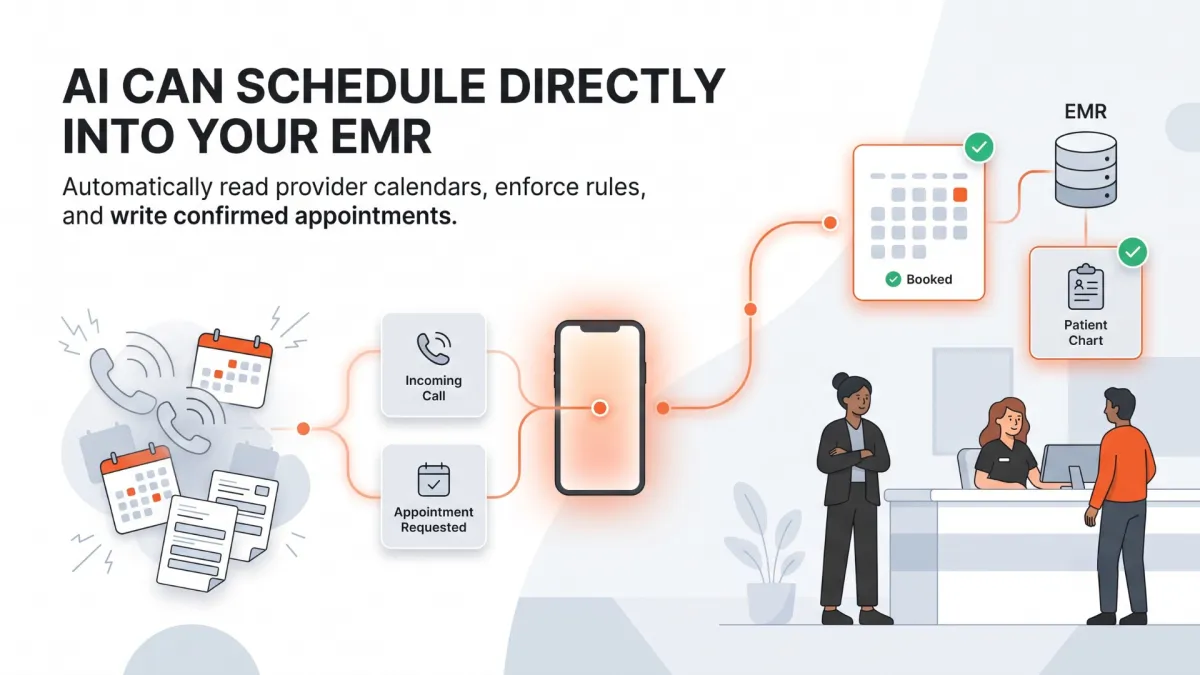
AI can schedule appointments directly into your EMR by using secure Application Programming Interfaces (APIs) to sync data in real time. Instead of relying on static forms or manual double-entry by staff, conversational AI listens to patient requests over the phone, evaluates live provider calendars, enforces practice-specific booking rules, and writes the appointment directly into your practice management system. This process eliminates hold times, prevents calendar errors, operates 24/7, and maintains strict HIPAA compliance standards without altering your clinical team's existing software routines.
Independent medical practices lose hundreds of hours each year to manual appointment scheduling. Every phone call requires a front desk team member to toggle between software windows, cross-reference provider calendars, verify patient identity, and manually input appointment details. During morning call surges, this manual bottleneck creates long hold times, dropped calls, and frustrated patients.
For practice owners and operations leaders, automated scheduling sounds ideal in theory. However, significant skepticism exists around whether artificial intelligence can handle real-world scheduling without creating calendar chaos. Practice managers reasonably worry about double bookings, incorrect visit types, missed scheduling rules, and security vulnerabilities inside their Electronic Medical Record (EMR) software.
Understanding how AI integrates with your existing technology reveals that automated scheduling is not a simple script or a risky guess. Modern healthcare AI relies on structured, secure API connections and precise rule execution to interact directly with your EMR.
When configured correctly, an AI receptionist reads live provider availability, enforces complex practice guidelines, and writes confirmed appointments straight to your calendar without human intervention.
The Manual Scheduling Bottleneck in Independent Practices
In most medical offices, scheduling an appointment over the phone is a high-touch, multi-step transaction. A single booking requires a front desk receptionist to navigate several administrative steps while maintaining a polite, professional conversation.
The receptionist must identify whether the caller is a new or returning patient, locate their chart inside the EMR, ask for current insurance details, and determine the clinical reason for the visit. From there, the receptionist must consult the provider’s calendar, select an appropriate visit length, check for specific equipment or room availability, and manually type the booking parameters into the system.
When call volume spikes, this manual workflow creates immediate operational friction across the office.
Call handle times stretch to five minutes or longer per scheduling interaction.
Receptionists rush through entries, leading to misspelled names or incorrect visit types.
In-office patients waiting at the front counter receive split attention from distracted staff.
Callers placed on extended hold frequently hang up and contact a competing clinic.
This friction is not caused by administrative inefficiency. It is the natural result of relying on human labor to execute repetitive data entry tasks between an analog phone line and a digital software system.
Why Static Online Forms and External Portals Fall Short
To reduce phone intake volume, many practices implement online scheduling portals or static web forms. While these tools aim to digitize intake, they often introduce new operational challenges for practice staff.
Static web forms do not schedule appointments in real time. Instead, they collect a patient's requested dates and send an email or portal message to the front desk. Staff members must then call the patient back to confirm whether that time slot is open, creating an inefficient cycle of phone tag.
Patient portals present a different set of hurdles. Portals require patients to remember login credentials, navigate complex menus, and complete multi-step verification processes before viewing a calendar. Many patients, particularly those who are ill or elderly, abandon portal booking and call the office directly.
Furthermore, traditional patient portals often lack the intelligence required to enforce nuanced scheduling rules.
They permit patients to book complex procedures in short consultation slots.
They allow back-to-back bookings that fail to account for provider travel or buffer times.
They create calendar gaps by failing to restrict specific visit types to designated days.
To achieve true automation, a scheduling system must manage complex, conversational requests over the phone while interfacing directly with live EMR data.
How EMR Integration Works Behind the Scenes
Connecting an AI receptionist to an Electronic Medical Record platform requires a secure, real-time data bridge. Rather than logging into the system as a human user through a web browser, AI platforms communicate with EMRs using Application Programming Interfaces, commonly known as APIs.
An API acts as a secure translator between two distinct software systems. It allows the AI platform to request specific data from the EMR, such as open calendar slots, and send structured data back to the EMR, such as a confirmed appointment record.
This communication happens in real time across two primary data mechanisms.
Direct Read Access When a patient calls to book a visit, the AI sends a secure query to the EMR calendar. The EMR responds instantly with live provider availability based on current calendar state, filtering out blocked times, personal time off, and previously booked slots.
Direct Write Access Once the caller selects an available time slot and completes intake verification, the AI sends a structured write request to the EMR. The EMR accepts the data, generates the appointment block on the provider's calendar, and links the entry to the appropriate patient chart.
This bi-directional data exchange occurs within milliseconds during a live phone conversation, ensuring the caller receives accurate scheduling options based on the exact state of your calendar.
Enforcing Custom Practice Rules and Provider Logic
A major concern among practice managers is whether an automated system can handle the complex, unwritten rules that govern daily clinic operations. Every provider maintains unique preferences regarding how their day is structured, and violating those preferences leads to clinical delay and staff frustration.
Modern voice AI platforms do not use generic scheduling templates. Instead, practice administrators configure exact rules and parameters during initial setup that the AI executes without deviation.
Visit Type Segmentation Practices assign specific duration and documentation rules to different visit types. The AI identifies the patient's need and applies the correct booking parameters automatically.
New patient consultations are assigned 30-minute slots with mandatory demographic capture.
Routine follow-up visits are assigned 15-minute slots.
Specialized procedural visits are restricted to specific days or times when necessary equipment is available.
Provider-Specific Pacing and Buffers If a physician prefers to limit new patient intakes to three per day, or requires a 15-minute buffer following specific minor procedures, the AI enforces those limits. It evaluates existing calendar density before offering time slots to callers.
Patient Verification and Matching Before creating a new record, the AI searches the EMR using key identifiers, such as full legal name, date of birth, and phone number. If an existing record is found, the new appointment is attached to the existing chart, preventing duplicate entries in your database.
Step-by-Step: An Automated Scheduling Call
To understand how conversational AI manages appointment booking, it helps to examine the workflow of a live phone interaction from start to finish.
1. Instant Call Answering and Intent Recognition The AI receptionist answers the call on the first ring, greeting the caller professionally. The patient speaks naturally, stating their need: "Hi, I need to schedule an appointment with Dr. Miller for knee pain."
2. Caller Identification and Record Lookup The AI verifies whether the caller is a new or returning patient by requesting their full name and date of birth. It queries the EMR database in real time to locate the patient's record or prepare a new patient shell.
3. Triage and Visit Type Selection The AI asks targeted clarifying questions to categorize the visit type accurately. It confirms that the patient is experiencing routine joint discomfort rather than acute trauma requiring immediate emergency care.
4. Real-Time Calendar Query The AI queries the EMR calendar for Dr. Miller's availability, filtering results based on orthopedics-specific booking guidelines for new patient evaluations.
5. Conversational Slot Selection The AI offers specific, open options to the caller in plain language: "I have an opening with Dr. Miller on Tuesday, August 11th at 10:00 AM, or Thursday, August 13th at 2:30 PM. Which works better for you?"
6. EMR Confirmation and Summary Delivery Once the caller selects a time, the AI writes the appointment directly into the EMR. It provides a clear verbal confirmation over the phone, details pre-visit instructions like bringing an ID, and sends a structured summary to the practice staff if additional review is required.
Security, Privacy, and HIPAA Compliance
Integrating artificial intelligence with healthcare software requires strict adherence to federal privacy regulations. Practice leaders must ensure that any automated tool protecting patient interactions meets established security benchmarks.
A compliant AI receptionist operates within strict data governance parameters.
Business Associate Agreements (BAAs): The AI vendor must execute a formal BAA, accepting legal responsibility for safeguarding Protected Health Information (PHI).
Data Encryption: All voice audio, text transcripts, and API data payloads are encrypted using TLS 1.2 or higher during transmission and AES-256 bit encryption at rest.
Model Isolation: Patient conversations and chart data are kept completely isolated. Information processed for your practice is never used to train public machine learning models or shared across client accounts.
Audit Trail Logging: Every API lookup, calendar edit, and record update is logged with exact timestamps, providing full visibility for practice compliance officers.
By maintaining these standards, an integrated AI platform provides secure automated scheduling while protecting your practice from regulatory risk.
The Practical Benefits of Direct EMR Scheduling
Eliminating manual data entry between your phone lines and your practice management software creates immediate improvements across administrative, clinical, and financial operations.
24/7/365 Scheduling Access Patients do not always manage healthcare needs during standard business hours. Direct EMR integration allows callers to book, reschedule, or confirm appointments late at night or on weekends, capturing scheduling demand that would otherwise be lost to competitors.
Elimination of Double-Entry Errors Manual data entry under pressure leads to typographical errors in patient names, insurance numbers, and contact details. Voice AI writes standardized data directly to the EMR, protecting chart integrity and lowering downstream billing rejections.
Zero Hold Times and Reduced Abandonment Because an AI receptionist answers every line instantly and scales to handle unlimited concurrent calls, patients never wait on hold to book a visit. Call abandonment drops to zero, and prospective patient conversion rates increase.
Reduced Staff Burnout Offloading repetitive phone booking frees your front desk team from constant phone interruptions. Staff can concentrate on welcoming arriving patients, processing insurance authorizations, and coordinating clinical care in a quiet, focused environment.
How Zaya Simplifies AI Appointment Scheduling Through Secure EMR Integration
Zaya helps independent medical practices automate appointment scheduling by connecting its AI phone receptionist directly to your existing EMR and practice management system. Instead of relying on manual data entry, Zaya reads real-time provider availability, follows your scheduling rules, and writes confirmed appointments directly into the patient's record.
Because the AI operates using secure EMR integrations, it can accurately identify returning patients, book the correct visit type, process cancellations and reschedules, and keep provider calendars up to date without disrupting your existing workflow.
Beyond scheduling, Zaya helps reduce administrative workload by answering every inbound call, capturing structured patient information, handling routine phone requests, and providing AI-generated call summaries for your staff. This allows your front desk team to spend less time on repetitive scheduling tasks and more time supporting patients in the office.
If your practice is looking to improve patient access while reducing manual scheduling work, Zaya provides a secure, EMR-integrated solution designed specifically for independent healthcare practices.
Frequently Asked Questions
How does an AI receptionist connect to an EMR system?
AI receptionists integrate with EMRs through secure APIs that allow them to read real-time provider availability and write confirmed appointments directly into the practice management system while following your scheduling rules.
Can an AI receptionist prevent double bookings?
Yes. Because the AI checks live calendar availability before offering appointment times, it schedules only open time slots and follows the provider-specific rules configured by your practice.
Does AI follow different appointment types and scheduling rules?
Yes. An AI receptionist can identify the appropriate visit type, apply the correct appointment length, honor provider preferences, enforce scheduling buffers, and restrict appointments based on your practice's configured rules.
Is patient information secure during AI scheduling?
Healthcare AI platforms are designed to protect patient information through secure API connections, data encryption, audit logging, and HIPAA-compliant security practices when properly implemented.
Can patients schedule appointments after business hours?
Yes. An AI receptionist can answer calls and schedule, reschedule, or cancel appointments 24/7 using real-time EMR availability, allowing patients to book care even when the office is closed.
Who benefits most from AI-powered EMR scheduling?
Independent medical practices with busy front desks often benefit the most because AI automates repetitive scheduling tasks, reduces hold times, and allows staff to focus on patient care instead of manual appointment management.
AI Receptionists and EMR Integration: The Smarter Way to Automate Appointment Scheduling
AI appointment scheduling becomes significantly more effective when it is directly integrated with your EMR. Instead of depending on manual data entry or disconnected scheduling tools, an AI receptionist can access live calendar availability, enforce your practice's scheduling rules, and update appointments in real time while maintaining secure patient data handling.
For independent medical practices, this approach reduces administrative burden, improves patient access, minimizes scheduling errors, and helps front desk teams focus on higher-value responsibilities.
If you're ready to modernize your appointment scheduling process, explore how Zaya's AI receptionist and secure EMR integration can help your practice deliver a faster, more efficient patient experience.
Talk to Zaya
Experience the difference. Tap the microphone to start a natural conversation with our AI right now.
You'll need to allow microphone access to start the demo.