
Voice AI for Patient Access: What It Is and How It Works With Your EMR
A patient calls after work to book a visit. If the call ends with a voicemail, your front desk still has to call back, find the patient, check the schedule, and enter the appointment. Answering the phone was only the first step.
Voice AI for patient access handles spoken phone requests and connects them to administrative work. For an independent or specialty practice, the useful question is what gets done before the call ends. Can the service book in your EMR, or does it leave your team another request to process?
This guide explains the call flow, what an EMR connection means, and what to check before choosing healthcare voice AI for your practice.
What voice AI for patient access means
Patient access starts before someone reaches the exam room. It includes finding an appointment, reaching the office, and getting a request to the right staff member. Voice AI covers the phone portion of that work.
An AI voice receptionist listens to a caller's request and handles the administrative steps within its scope. It should have a clear stopping point when a request needs staff review. A patient asking for a visit and a patient asking whether to change a medication need different responses.
For a small practice, the aim is practical: let patients complete routine phone tasks while the front desk handles work that needs a person. Our guide to EMR-integrated answering services explains why the connection to the patient record matters.
What Zaya does on patient calls
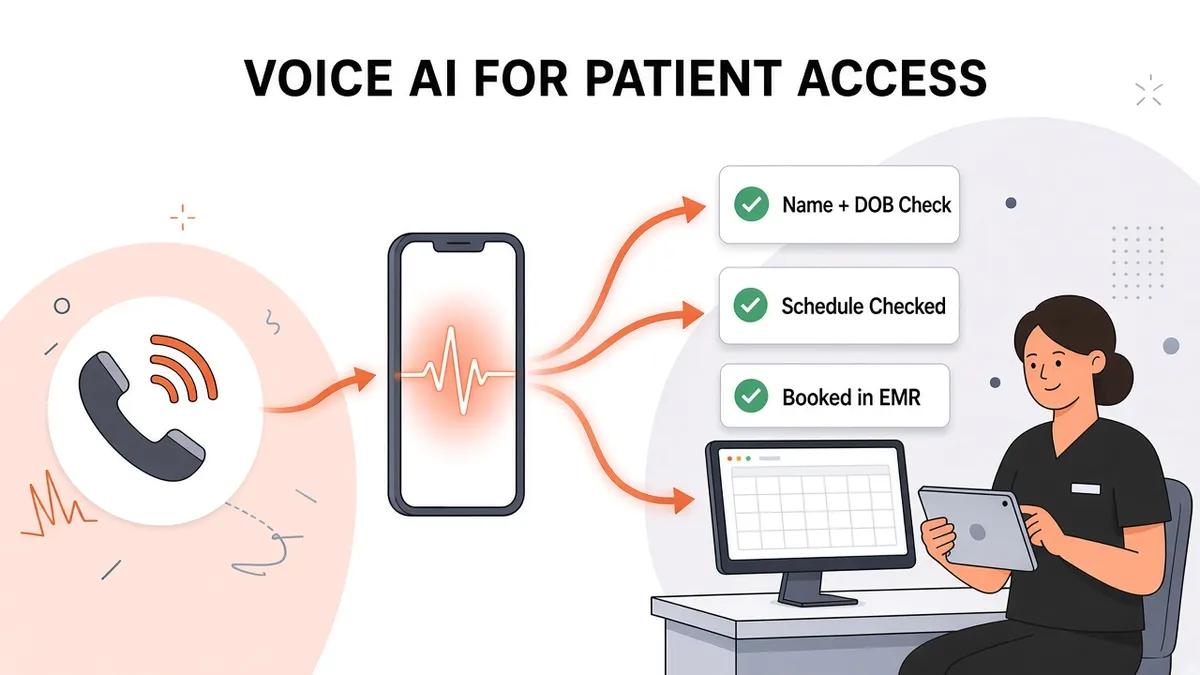
Zaya Health answers calls 24/7. Its confirmed functions include verifying patients by name and date of birth, checking the schedule, and booking appointments directly in the EMR. It also adds telephone encounters and sends messages into the EMR, to email, or to a protected system.
These functions address different outcomes. A booked visit is an appointment on the schedule. A refill request is a message for staff to review. A telephone encounter documents a call. During evaluation, ask to see each outcome in the destination your team will actually use.
A scheduling call
For an existing patient seeking an appointment, the basic workflow is:
- The caller explains that they want to book a visit.
- Zaya verifies the patient by name and date of birth.
- Zaya checks the schedule.
- The appointment is booked directly in the EMR.
Before launch, discuss your scheduling requirements with the vendor. A specialty practice may have different expectations for an initial consultation and a follow-up. Ask which requirements the service can support and which requests your staff will need to review.
A request for the care team
If a caller requests a prescription refill, the administrative task is to get the request to the team. Zaya can add a telephone encounter or send a message to the agreed destination. Clinical decisions remain with the practice's clinicians.
The distinction matters when you assess a demonstration. Receiving a refill request does not mean approving it. Our guide to refill requests and scheduling calls covers those separate workflows.
How the EMR connection works at a high level
Think of the connection as the path between the conversation and your working records. The voice service handles the spoken request; the EMR holds the schedule and patient record. The integration lets supported administrative actions reach that system.
For booking, checking availability and entering the appointment are separate steps. Ask a vendor to demonstrate both. Seeing a time offered on the phone does not, by itself, show that the appointment reached the EMR.
Documentation is another part of the connection. Ask where a telephone encounter appears and where staff should look for messages. Your team should know which requests have been completed and which still need attention.
An integration label does not explain every detail. It does not tell you which visit types are supported, what access is needed, or how exceptions are handled. Have the vendor walk through your actual workflow before you rely on the connection.
Voice AI integrations to review for your practice
Start with your EMR, then ask about the tasks you need performed. Zaya's integrations hub is the starting point for reviewing systems.
DrChrono, Elation, and ModMed
If you are looking for voice AI for patient access that integrates with DrChrono, begin with the DrChrono integration page. Bring a sample scheduling request and ask to see how the booking appears in the EMR.
Practices evaluating voice AI with Elation or ModMed should use the same approach. Describe your visit types, the way staff use the schedule, and where telephone requests belong. Ask the vendor to demonstrate the supported workflow rather than treating the EMR name as the full answer.
eClinicalWorks and Epic
Does voice AI support real-time appointment booking inside eClinicalWorks? Zaya books directly in the EMR and lists an eClinicalWorks integration. To assess real-time behavior for your practice, ask to see availability checked and a booking appear in your scheduling workflow. Confirm timing and handling of unavailable slots during evaluation.
For an Epic AI phone integration, start with the Epic integration page. Ask what setup your environment requires and which administrative workflows are supported. Do not assume that every connection works the same way across practices.
Other EMRs
You can also review Zaya's pages for athenahealth, NextGen, Tebra, and AdvancedMD. For each system, use the same test: follow a request from the phone call to its final place in the EMR or message destination.
What setup involves
Zaya's integration setup takes about two weeks. Use onboarding to make the practice's expectations concrete and confirm what the service can support.
Clinics keep their own phone number and forward calls. Decide how your existing phone system will send calls to the service, then test the path patients will use. Discuss whether your initial focus is after-hours coverage, daytime overflow, or another agreed arrangement.
Prepare a short workflow sheet covering:
- The appointment requests you want handled and those needing staff review.
- Patient verification expectations and how unmatched callers should be handled.
- Where telephone encounters and messages should appear.
- Who reviews requests that still need a response.
- The practice's emergency wording and on-call protocol.
These are setup questions, not a reason to assume every requested rule is already supported. Confirm the details together. For a medical emergency, the practice's protocol should tell callers to call 911.
Questions to ask before choosing voice AI
Ask to see ordinary calls and awkward ones. An ordinary booking shows the basic function. A caller whose details do not match shows where the workflow stops and staff take responsibility.
Useful questions include:
- Can you show a completed booking in our EMR?
- How do you verify a patient before acting on a record?
- Where will our staff find telephone encounters and messages?
- What happens when the request cannot be completed?
- What happens if the service or EMR connection is unavailable?
- Will you sign a BAA, and what HIPAA safeguards are in place?
Zaya signs a BAA with every client and has HIPAA safeguards. Ask reliability and fallback questions separately; a booking demonstration does not establish how service interruptions will be handled.
FAQ
What is voice AI for patient access?
Voice AI for patient access handles spoken phone requests for administrative tasks such as scheduling and getting messages to practice staff. Its usefulness depends on which tasks it can complete and how it connects to the practice's EMR.
Can Zaya book appointments directly in the EMR?
Yes. Zaya checks the schedule and books appointments directly in the EMR. Ask to see the workflow for your EMR and the appointment requests your practice wants handled.
Does an EMR integration mean every workflow is supported?
No. Confirm the supported tasks, setup requirements, and handling of requests that need staff review. An integration name alone does not explain those details.
How long does Zaya's integration setup take?
Zaya's integration setup takes about two weeks. Use that time to confirm call forwarding, verification expectations, scheduling needs, and message destinations.
Do we need a new phone number?
No. Clinics keep their own number and forward calls to Zaya. Work through the forwarding arrangement with your phone system during setup.
See the call flow
Book a demo to review your EMR workflow, or call (713) 597-5176 to hear Zaya answer.