
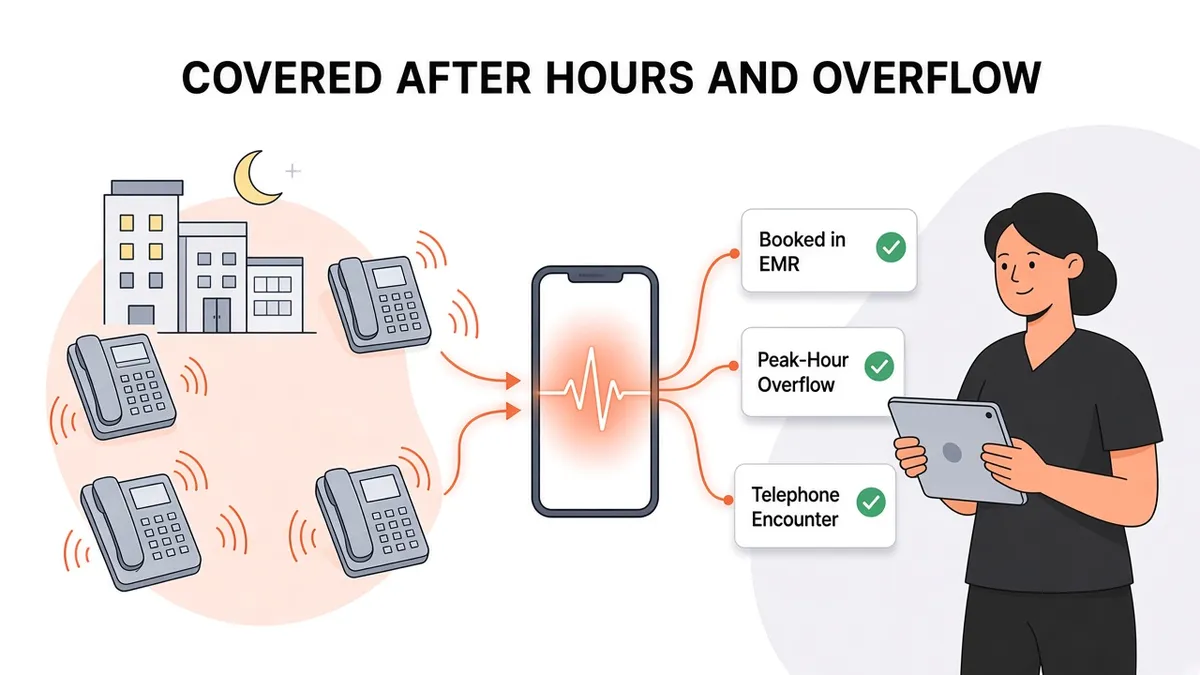
How an AI After-Hours and Overflow Answering Service Works
Every medical practice has two phone problems that look different but have the same root. The first is after hours: the office is closed, but patients still call. The second is overflow: the office is open, but every line is busy, and calls keep coming. See how it works for your clinic on our after-hours answering service page.
Most practices handle these with two separate fixes. A traditional after-hours answering service takes messages at night, and during the day, overflow calls roll to voicemail or sit on hold. This post looks at how an AI answering service connected to your EMR can cover both situations with one consistent workflow, and what it should and shouldn't do on those calls.
Two kinds of "nobody's free to answer"
After-hours calls
After-hours calls tend to fall into a few groups:
Patients who want to book an appointment and called after their own workday ended.
Existing patients with a routine request, like a refill, a form, or a billing question.
Patients with a clinical concern who need guidance on what to do next.
Callers who need emergency care.
With a traditional answering service, most of these calls end the same way: someone takes a message, and your staff work through the stack the next morning. The patient who wanted to book still doesn't have an appointment.
Overflow and peak-hour calls
Overflow happens during business hours. Common pressure points include:
The morning rush, when patients call as soon as the office opens.
Lunch coverage, when fewer people are at the front desk.
Monday mornings and the days after holidays, when the weekend's backlog arrives at once.
Staff absences, when one person out sick changes the whole day.
During these windows, the person answering the phone is also checking patients in, verifying insurance, and handling whoever is standing at the window. Calls go to hold or voicemail, and some callers hang up. (We cover the downstream impact of those unanswered calls in more detail elsewhere. This post is about how to handle the calls themselves.)
Why one workflow for both makes sense
The calls that arrive at 7 p.m. and the calls that arrive during the 8:30 a.m. rush are largely the same calls: scheduling, refills, questions, and messages for the care team. The only difference is who's available to take them.
When after-hours and overflow coverage come from different places, patients get a different experience depending on when they call, and your staff get messages in different formats from different sources. An AI answering service that's connected to your EMR can handle both situations the same way, and the results land in the same place.
How an AI answering service handles after-hours calls
Here's what an after-hours call can look like with Zaya Health:
The patient calls and says what they need. For example: "I'd like to book a follow-up visit next week."
Zaya verifies the patient by name and date of birth before it looks at or acts on their record.
Zaya checks the schedule in your EMR and offers available times.
The appointment is booked directly in the EMR, so it's already on the schedule when your team arrives in the morning.
A telephone encounter is added to the patient's chart to document the call.
For requests that need a person, like a refill or a question for the care team, Zaya collects the details and records them as a telephone encounter or sends a message into the EMR, to email, or to another protected system. Your team starts the day with organized, documented requests instead of a pile of voicemails. For more detail on those call types, see how an AI answering service handles refill and scheduling calls.
What about urgent and emergency calls?
An AI answering service is not an emergency service. If a caller is having a medical emergency, they should hang up and call 911. For urgent clinical concerns after hours, your practice should keep following its own on-call protocol. Before you go live with any after-hours service, make sure your after-hours greeting and on-call process are clear and up to date.
How an AI answering service helps with overflow
During business hours, the idea is simple: when your staff can't get to a call, Zaya can answer it instead of sending it to voicemail. How calls reach Zaya depends on how your phone system is set up, which is something to work out during onboarding.
On an overflow call, Zaya does the same things it does after hours:
Verifies existing patients by name and date of birth.
Checks the schedule and books appointments directly in the EMR.
Adds a telephone encounter to the chart.
Sends messages into the EMR, to email, or to another protected system for anything your team needs to handle.
The difference for your front desk is that a routine scheduling call taken during the rush is already finished, not waiting as a voicemail to return later. The person at the window can stay focused on the patient in front of them.
After-hours AI vs. a traditional after-hours answering service
Traditional after-hours service | EMR-connected AI answering service | |
|---|---|---|
Booking appointments | Usually takes a message for a callback | Checks the schedule and books in the EMR |
Documentation | Message delivered by phone, fax, or portal | Telephone encounter added to the chart |
Daytime overflow | Often a separate arrangement, or not covered | Same workflow during business hours |
Patient verification | Varies by service | Name and date of birth |
Morning follow-up | Staff work through messages | Booked visits are already on the schedule |
For a fuller comparison, read AI receptionist vs. traditional answering service.
What to set up before you rely on it
After-hours and overflow coverage works best when your rules are written down. Before go-live, decide:
Which visit types Zaya can book and with which providers.
Where each type of message should go: into the EMR, to email, or to another protected system.
Your after-hours emergency message, telling callers to call 911 in an emergency.
Your on-call protocol for urgent clinical concerns, and how callers are told about it.
How overflow calls reach Zaya in your phone system during business hours.
With Zaya Health, setup takes about two weeks.
It depends on your EMR connection
The value of after-hours booking depends on whether the service can actually work in your EMR. Without that connection, an "AI answering service" is just a faster way to take messages. Zaya works with these systems:
You can see the full list on our integrations page, and read more about why it matters in EMR-integrated answering service: what it is and why it matters.
Questions to ask any after-hours or overflow vendor
Can it book appointments directly in my EMR, or only take messages?
Does it document calls in the patient's chart?
How does it verify who the caller is?
Where do messages go, and are they kept in a protected system?
Will you sign a BAA?
What does it tell callers in an emergency?
Can the same service cover daytime overflow, and how do calls get routed to it?
How long does setup take?
Our AI receptionist buying guide has a longer checklist.
Is it right for your practice?
After-hours and overflow coverage is likely worth a look if:
Your phones are hardest to keep up with at opening, lunch, or on Mondays.
Your team spends the first part of each day returning after-hours messages.
Patients call in the evening hoping to book and can't until the next day.
One staff absence is enough to put calls on hold all day.
Hear it for yourself
The easiest way to judge after-hours and overflow handling is to call it like a patient would. Call our demo line at (713) 597-5176, ask to book an appointment, and see how Zaya handles the call.
Prefer a walkthrough? Book a Demo.